

◦ Comprehensive security
◦ Support
VPS → Linux VPS
What is Linux VPS? Uses, benefits, and how it works
Key takeaways:
- A Linux VPS is a virtual private server that runs a Linux operating system.
- Linux VPS hosting gives you isolated resources, root access, and more control than shared hosting.
- Linux is popular for VPS hosting because it is open-source, efficient, flexible, and widely supported.
- A Linux VPS can host websites, applications, databases, development environments, game servers, VPNs, and private cloud tools.
When you’re ready to move beyond shared hosting, but not quite at the dedicated server stage, a Linux VPS hits the sweet spot. It gives you more power, flexibility, and control without breaking the bank or requiring a full IT team to manage it.
A Linux VPS gives growing businesses, agencies, developers, and site owners more control without moving to a full dedicated server.
This guide explains what a Linux VPS is, how it works, when it makes sense, and what to consider before choosing a Linux VPS hosting provider.
What is Linux VPS?
A Linux VPS (virtual private server) is a type of hosting environment that uses virtualization to divide a physical server into multiple private server instances. Each VPS runs its own operating system, and in this case, it’s a Linux-based OS like Ubuntu, AlmaLinux, or Rocky Linux.
You get dedicated resources, including CPU, RAM, and storage, so you’re not competing with other users. And because Linux is open-source, you benefit from a flexible, secure, and cost-efficient environment that can be customized to your needs.
How does Linux VPS hosting work?
Linux VPS hosting works through virtualization. A physical server runs virtualization software, such as KVM or VMware, which divides the server into separate virtual machines.
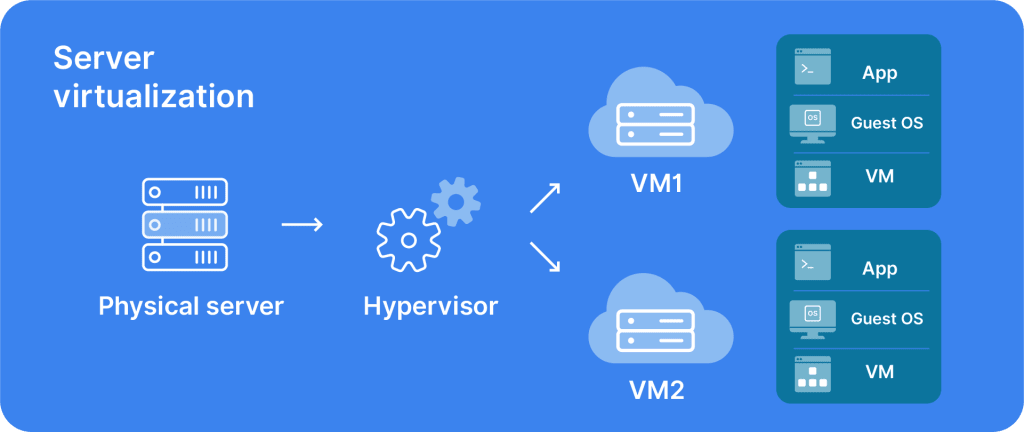
Each VPS receives its own share of CPU, RAM, storage, and bandwidth. Each virtual server behaves like an independent server, and Linux runs as the operating system inside that environment.
Because VPS resources are isolated, your server performance is less likely to drop because of another user’s traffic spike, script, or resource-heavy workload on the same physical machine. That isolation is one of the main differences between Linux VPS hosting and shared hosting.
Why choose a Linux VPS? 6 key benefits
Running a Linux VPS offers a range of advantages for developers, businesses, and site owners who want more control than shared hosting can offer.
1. Full control
With root access, you can install, configure, and manage any software you want. No cPanel restrictions or waiting on support to tweak settings.
That control is useful when your site or application needs a custom stack that shared hosting does not support.
2. Resource isolation
Easily scale your server resources up or down as your site traffic grows or changes. You don’t have to start over, just upgrade your VPS plan. This helps you adjust resources without changing hosting models.
3. Scalability
Easily scale your server resources up or down as your site traffic grows or changes. You don’t have to start over, just upgrade your VPS plan. This helps you adjust resources without changing hosting models.
4. Cost-effectiveness
A Linux VPS delivers many of the benefits of a dedicated server but at a much lower price point. Plus, Linux itself is free and doesn’t require licensing fees.
That can make Linux VPS hosting a cost-effective choice for teams that need more control than shared hosting without the higher costs of dedicated infrastructure.
5. Security and reliability
Linux is known for its stability and strong security model. When paired with isolated VPS environments, you’re in a good spot to fend off threats.
Linux VPS security still depends on good server management. That includes software updates, SSH security, firewall rules, backups, monitoring, and user permission reviews.
6. Resource efficiency
Linux is often lightweight and efficient, which leaves more resources available for websites, apps, databases, and supporting services.
What is Linux VPS used for?
Linux VPS hosting is a flexible choice that fits a variety of business needs and technical goals.
| Use case | How Linux VPS helps |
|---|---|
| Website hosting | Supports business sites, blogs, ecommerce stores, CMS platforms, and custom stacks |
| Web applications | Runs app code, APIs, backend services, and background processes |
| Database hosting | Supports MySQL, PostgreSQL, MariaDB, and other database tools |
| Development and testing | Gives developers isolated environments for building, testing, and deployment |
| Game server hosting | Supports multiplayer servers such as Minecraft, Valheim, Palworld, or CS:GO when compatible |
| VPNs | Can run private VPN services for secure access |
| Private cloud storage | Supports tools such as Nextcloud or other self-hosted platforms |
| Email servers | Can support private email hosting with the right security and maintenance |
Whether you’re running a business site, blog, or ecommerce store, a Linux VPS gives you reliable performance and room to grow.
Popular Linux distros for VPS servers
A Linux distro (short for distribution) is a version of the Linux operating system bundled with specific tools, libraries, and features. Different distros suit different workloads, so it’s worth knowing the top choices for VPS hosting.
| Linux distribution | Common fit |
|---|---|
| Ubuntu | Popular general-purpose option with broad documentation, regular updates, and community support |
| Debian | Stable option for users who prefer conservative releases and long-running server environments |
| AlmaLinux | Enterprise-style Linux option often used as a CentOS alternative |
| Rocky Linux | Enterprise-style Linux option designed for long-term stability and RHEL-based migrations |
| CentOS | Older deployments may still use it, though many users have moved to AlmaLinux or Rocky Linux |
Ubuntu VPS
Ubuntu is one of the most popular and user-friendly Linux distributions. Backed by Canonical, it has a huge community, regular updates, and long-term support (LTS) versions.
Why Ubuntu works well on a VPS:
- Easy to use, even if you’re newer to Linux
- Extensive online documentation and support
- Compatible with a wide range of server software
- Frequent security patches and system updates
AlmaLinux
AlmaLinux is a CentOS alternative built for stability and long-term support. It’s designed to be 1:1 binary-compatible with Red Hat Enterprise Linux (RHEL), making it ideal for production environments.
Benefits of AlmaLinux for VPS:
- Reliable and enterprise-grade
- Free and open-source with no license fees
- Maintained by a community-driven foundation
- Long-term support for up to 10 years
Rocky Linux
Rocky Linux is another RHEL-compatible distro, created by one of CentOS’s original co-founders. Like AlmaLinux, it aims to fill the gap left by CentOS’s shift in direction.
Why choose Rocky Linux:
- Strong community support and enterprise focus
- Great for RHEL-based server migrations
- Stable, secure, and production-ready
- Transparent governance and roadmap
Linux VPS vs dedicated server
A Linux VPS uses virtualization to give you a private slice of a physical server. A dedicated server gives you the entire physical machine.
Linux VPS hosting is usually more affordable and easier to scale than dedicated hosting. Dedicated servers can make sense for very high resource needs, strict isolation requirements, or specialized workloads that need full physical-server control.
For many growing websites and applications, Linux VPS hosting provides enough control and performance before a dedicated server becomes necessary.
Linux VPS vs Windows VPS
Linux VPS and Windows VPS hosting differ mainly by operating system, management style, software compatibility, and licensing.
| Feature | Linux VPS | Windows VPS |
|---|---|---|
| Operating system | Linux distributions such as Ubuntu, Debian, AlmaLinux, or Rocky Linux | Windows Server |
| Licensing | Often lower cost because Linux is open-source | Usually includes Windows licensing costs |
| Management style | Often managed through SSH, with optional control panels | Often managed through Remote Desktop or a GUI |
| Common uses | Web apps, databases, CMS platforms, development, open-source stacks | .NET apps, Microsoft SQL Server, IIS, Windows-specific software |
| Best fit | Users who want open-source flexibility and Linux tooling | Users who need Microsoft-specific applications |
Managed vs unmanaged Linux VPS
Linux VPS hosting can be managed or unmanaged.
Self-managed Linux VPS
Self-managed Linux VPS hosting gives you more control over setup, updates, security, backups, troubleshooting, and ongoing maintenance. It can work well for developers, system administrators, and technical teams that want direct control over the server.
Managed Linux VPS
Managed Linux VPS hosting gives you the control of VPS hosting with more support for server management, monitoring, updates, and technical issues, depending on plan scope.
Managed VPS also helps teams get Linux control without taking on every operational task alone.
Linux VPS resource planning
Linux VPS resource needs depend on what you plan to host, how much traffic you expect, and how much server management support you want.
| Workload | Resource planning notes |
|---|---|
| Small website | Start with modest CPU and RAM, then scale as traffic grows |
| Ecommerce site | Plan for traffic spikes, database load, backups, and security |
| Web app or API | Consider CPU, RAM, runtime, database, and background workers |
| Database server | Prioritize RAM, storage performance, backups, and monitoring |
| Game server | Check game-specific CPU, RAM, latency, and player-count needs |
| Development environment | Match resources to build tools, test environments, and containers |
What to consider before choosing Linux VPS
Linux VPS hosting gives you more control, but it also comes with more responsibility than shared hosting.
Consider whether you are comfortable with SSH, command-line tools, software updates, firewall configuration, backups, and server monitoring. If your team would rather not manage those tasks directly, a managed VPS plan or control panel can reduce complexity.
Windows-only software also needs the right environment. If your application depends on Windows Server, Microsoft SQL Server, IIS, or .NET-specific tooling, a Windows VPS may be a better fit.
Linux VPS control panels
Many Linux VPS tasks happen through SSH and the command line, but control panels can make day-to-day management easier.
Common Linux VPS control panels include cPanel, Plesk, and InterWorx. Depending on the control panel, you may be able to manage websites, domains, databases, email, SSL certificates, backups, users, and server settings through a web-based interface.
Control panel availability can affect how comfortable your team feels managing the VPS.
Linux VPS security basics
Linux VPS security starts with a few foundational practices: use SSH keys, keep the operating system and applications updated, configure a firewall, limit user permissions, back up data, and monitor server activity.
For more detailed VPS protection steps, see Liquid Web’s VPS security tips.
How to choose a Linux VPS hosting provider
Not all VPS providers are created equal. Here’s what to look for when picking the right host for your Linux VPS:
- Performance: Look for SSD storage, guaranteed resources, and fast CPUs. These all directly affect your site or app speed.
- Uptime and reliability: Aim for a provider with a strong uptime SLA (99.99% or higher) and a track record of consistent service.
- Support: 24/7 support with Linux expertise is a must, especially if you run into issues with your VPS stack.
- Security: Features like DDoS protection, server firewalls, and regular backups should be standard.
- Scalability: Make sure you can upgrade your VPS plan easily as your needs grow—without downtime or migration headaches.
- Linux distro options: Choose a host that offers the specific distro you want or need for your workloads.
Also consider management levels, control panel options, backup options, monitoring, and whether the provider can support your workload as it grows.
Linux VPS FAQs
Getting started with VPS hosting
A Linux VPS gives you an isolated server environment running Linux, with more control, flexibility, and scalability than shared hosting.
Start by deciding what you need to host, whether you prefer command-line or control-panel management, and how much support you want for setup and maintenance.
Liquid Web Linux VPS hosting gives growing businesses, agencies, and developers flexible server options with performance, management levels, and expert support designed for sites and applications that need room to grow. Explore Liquid Web Linux VPS hosting to choose the right environment for your next project.
Additional resources
VPS: A Beginner’s Guide →
A complete beginner’s guide to virtual private servers
Managed VPS vs self-managed VPS hosting →
What’s the difference and which is right for you?
Expert tips for managing your own VPS →
Tools, tips, tutorials, courses, and more